Glyxr - Details
Real-time Glucose Monitoring
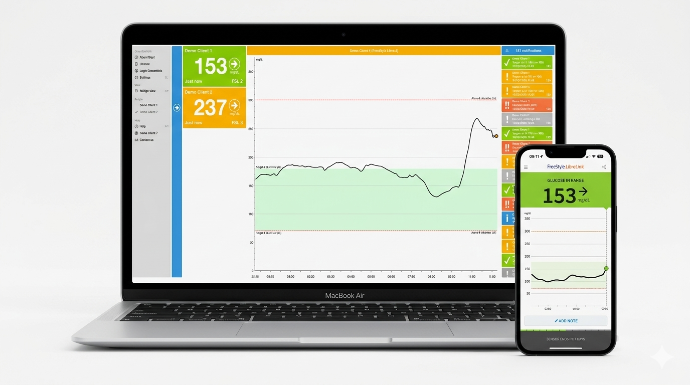
Glyxr is a desktop companion application that displays glucose monitoring data from Abbott's LibreLinkUp system on your Mac or Windows computer.
Important Medical Disclaimer
⚠️ Not a Medical Device or Medical Advice
Glyxr is an information display tool, not a medical device.
- Glyxr does not diagnose, treat, cure, or prevent any disease
- Glyxr does not provide medical advice or recommendations
- All medical decisions should be made in consultation with qualified healthcare professionals
- Glyxr displays data from Abbott's LibreLinkUp system but is not manufactured, endorsed, or affiliated with Abbott
- Users should continue to follow their healthcare provider's instructions for diabetes management
- In case of medical emergency or concerning glucose readings, contact your healthcare provider immediately
- Glyxr should not replace regular glucose monitoring practices or medical supervision
Data Source: Glyxr retrieves and displays data that has already been authorized and shared through Abbott's LibreLinkUp platform. All glucose readings originate from Abbott FreeStyle Libre sensors and the LibreLinkUp ecosystem.
Copyright Information
Who has which trademark rights ?
Abbott Inc has all trademark rights on the following products:
- LibreLink FreeStyle 2 patches, software and systems
- LibreLink FreeStyle 3 patches, software and systems
- LibreLinkUp software and systems
The Glyxr software is owned by Bas Eshuis, Belgium.
Background & Story Section
Why Glyxr was created
Managing diabetes is challenging enough. For families and caregivers supporting loved ones with diabetes, the concern never stops. We recognized that while Abbott's LibreLinkUp mobile app is excellent, many caregivers spend their days at a computer—and constantly picking up their phone to check glucose levels isn't practical.
Glyxr was born from a simple need: to make glucose monitoring data accessible where caregivers actually spend their time—at their desks. Whether you're working from home, managing household tasks, or simply want the reassurance of seeing glucose values without interrupting your workflow, Glyxr brings that information front and center.
The Desktop Advantage
Smartphones are personal devices that we carry everywhere, but desktop computers offer something different: persistent visibility. With Glyxr's always-on widgets, you don't need to unlock your phone, open an app, or interrupt what you're doing. The information is simply there, updating automatically, giving you peace of mind without effort.
Privacy and Authorization First
We built Glyxr with privacy as a fundamental principle. All monitoring requires explicit authorization through Abbott's LibreLinkUp system. The person being monitored maintains complete control over who can see their data and can revoke access at any time through the Abbott LibreLinkUp iOS app .
Product Overview Section
What is Glyxr?
Glyxr is a desktop companion application that displays glucose monitoring data from Abbott's LibreLinkUp system on your Mac or Windows computer. Designed for caregivers, parents, and family members, Glyxr makes it easier to monitor the glucose levels of children, elderly relatives, or other loved ones who use Abbott's FreeStyle Libre continuous glucose monitoring system.
By bringing LibreLinkUp data to your desktop, Glyxr ensures you're always just a glance away from the information you need—without constantly checking your phone.
Key Features
Always Visible, Always Informed
With Glyxr's customizable widgets, glucose readings stay visible on your desktop at all times. Whether you're working, browsing, or relaxing, you'll never miss an important glucose reading.
Real-Time Glucose Monitoring
- View current glucose values instantly
- See trend arrows and patterns at a glance
- Monitor up to 8 people simultaneously
- Track multiple family members from one dashboard
Comprehensive Data Visualization
- Interactive graphs showing glucose trends over time
- Clear visual indicators for glucose ranges
- Daily data analysis
Flexible Display Options
- Choose which data elements to display
- Customize widget position
- Select between compact and detailed views
- Dark mode and light mode support (coming in a future version)
Automated Reporting
- Optional automatic reports delivered to your PC or Mac
- Notifications and Value data included in PDF or txt formats
- Track glucose management progress
Multi-Person Monitoring
- Follow up to 8 individuals simultaneously
- Quickly switch between different people
- Color-coded displays for easy identification
Technical Requirements
Mac (macOS):
- macOS 11.0 (Big Sur) or later
- Active internet connection
- Valid LibreLinkUp account with authorized connections
Windows:
- Windows 10 or later
- Active internet connection
- Valid LibreLinkUp account with authorized connections
Prerequisites:
- The person being monitored must use Abbott FreeStyle Libre CGM
- LibreView iOS app must be installed on the monitored person's device
- Authorization must be granted through LibreLinkUp prior to using Glyxr
How It Works
Simple Setup in Three Steps:
1. Authorization Required The person you wish to monitor must first authorize you through Abbott's LibreLinkUp iOS app. This ensures privacy and consent are maintained at all times.
2. Download Glyxr Install Glyxr on your Mac (macOS) or Windows PC from the respective app stores (see our Pricing & Downloads page).
3. Sign In & Start Monitoring Log in with your LibreLinkUp credentials, and Glyxr will display glucose data from all authorized connections on your desktop.